


Find My Phone by Clap Launcher
4.410.29K Reviews
App Specs
- Version
- 1.21.0
- Updated On
- License
- Free
- Downloads
- 1,000,000+
- Developer
- AtomApplications
- Categories
- Tools
- Platform
- Android
Screenshots
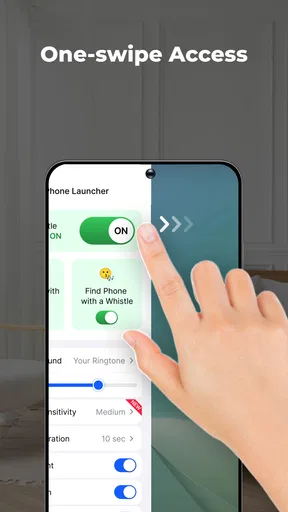
 Analysis by AppCompare
In a shared home, a misplaced phone can turn into a surprisingly social problem: someone is calling from the kitchen, another person is lifting sofa cushions, and the owner is trying to remember where they last put it. I like the idea behind Find My Phone by Clap Launcher for this small, familiar kind of search. It offers a sound-based way to prompt a nearby phone to respond, rather than requiring another person to borrow it and navigate menus. That makes it most appealing for everyday misplacement, not for recovering a device that has been lost somewhere outside the home.
A useful household routine, with clear limits
Picture coming in with groceries, setting your phone down somewhere unusual, then needing it a few minutes later. If the app is enabled and the phone is close enough to hear a clap, a signal may be quicker than asking everyone to search room by room. It can also help when a phone slips under a blanket or into a bag at home, where a visual search is awkward. I would treat it as a shortcut for nearby searches, not as a substitute for a service designed to locate a missing device remotely.
That distinction matters in a household. A clap-triggered tool depends on the phone being within hearing range and able to detect the sound; distance, walls, background noise, and where the device is tucked away can all affect the result. If the phone is muted, out of reach, or not listening for the trigger, a different method may be more useful. I would keep the usual device-finding option available for situations where the phone is not close by, and use this app for the familiar “where did I leave it?” moment.
Set it up on the owner’s phone, not someone else’s
The most practical setup is on the device that regularly goes missing. I would install it, check the app’s setup prompts, and test the clap response in the rooms where the phone tends to disappear before relying on it. A quick test under ordinary household conditions helps you learn whether the chosen sensitivity is too eager or too difficult to trigger. It is also worth checking the selected sound or light response while other people are nearby, so the signal is noticeable without being needlessly disruptive.
In a shared home, it is sensible to keep ownership and control straightforward: each person should decide whether the app belongs on their own phone and how that phone responds. The app is a locating aid, not a family coordination system. I would not assume it lets one household member locate another person’s device, share its location, or manage settings remotely. If someone else is helping search, the owner can ask them to clap nearby or make noise while the phone remains on its owner’s account and under their control.
Claps are convenient, but not private or foolproof
Sound detection creates a trade-off that is easy to overlook. The gesture is simple, but a clap is audible to everyone nearby, and a phone responding with a ringtone, vibration, or flashing light may draw attention too. That is fine in a living room, but less suitable in a library, meeting, classroom, or other quiet shared space. Before enabling a noticeable response, I would think about where the phone is likely to be misplaced and whether a sound or light would cause embarrassment or disturbance.
For households with children or older relatives, the straightforward idea may be easier to explain than a map-based finding service: make the agreed signal, then listen or look for the phone. Still, I would show the owner how to enable the feature and adjust its response rather than quietly setting it up on their device. The Everyone age classification describes the app’s content rating; it is not a guarantee that every child can manage the settings independently or that the tool is appropriate for every family routine. A shared household should agree on when to use it and avoid turning the sound into a joke that repeatedly interrupts other people.
Worth Reading Before You Choose

EA SPORTS FC Mobile 26 Is a Bigger Football Game, but It Takes Time

Flipboard Shows What News Apps Must Do Beyond the Feed

Switching to Android Auto Means Rethinking Your Driving Routine

Google Calendar Makes a Crowded Week Easier to Manage

Ludo King Makes the Most of the Minutes Between Plans

Baby Panda World Brings Quick Play to Modern Phones, but Its Game Library Feels Busy
How It Works
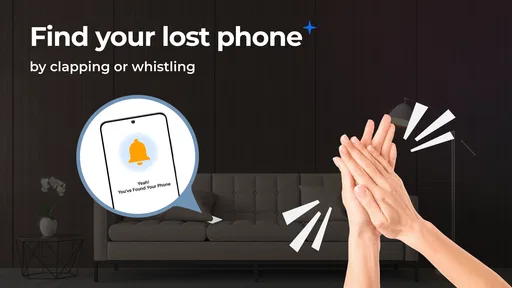
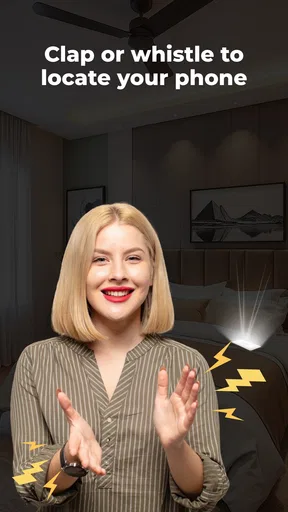
Once you download and install the app, setting it up is a breeze. You just need to enable the app, and it runs in the background, waiting for your clap signal. The idea is simple: clap your hands, and your phone will start ringing, lighting up, or vibrating, helping you locate it instantly. It’s like having your phone trained to respond to applause. Pretty cool, huh?
User Experience and Features
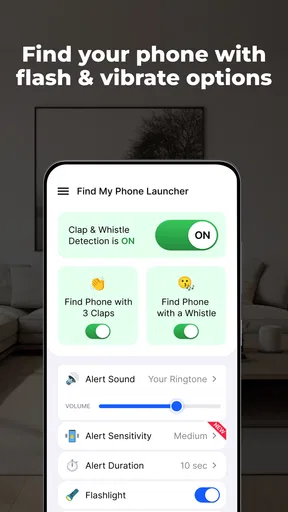
Find My Phone by Clap Launcher is designed with simplicity in mind, which I absolutely love. The interface is straightforward, with clear instructions that even the least tech-savvy among us can follow. You can customize the sensitivity of the clap detection, ensuring that your phone responds to your unique clapping style. No more accidental triggers from random noises!
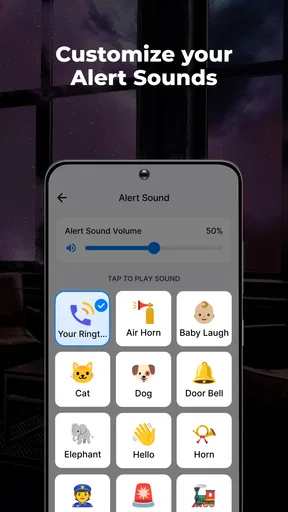
The app also allows for customization in terms of response. You can choose the ringtone, vibration pattern, or even whether the flashlight blinks. This level of personalization is a nice touch, making the app feel tailored to your preferences.
Practicality and Everyday Use
Now, you might be wondering about battery usage. Luckily, the app is optimized to run efficiently in the background without draining your battery life. I found that the battery impact was minimal, which is a huge plus for anyone concerned about their phone’s longevity.
In everyday use, it’s surprisingly reliable. I tested it in various environments, from noisy parties to quiet rooms, and it responded well each time. However, in extremely loud settings, it might struggle a bit, but that’s somewhat expected.
Matching the tool to the situation
As a tools app from AtomApplications, this is a focused little utility rather than a full device-management suite. It is free, currently at version 1.7.1, and has an average rating of 4.3 from around 5,300 ratings, with roughly 2,300 written reviews and over 500,000 installs. Those figures suggest that many people find the basic idea useful, though popularity does not remove the need to test it on your own phone and in your own rooms.
Compared with the usual alternatives, the biggest advantage is immediacy: there is no need to ask another person to call your number or search through a tracking interface when the phone is somewhere nearby. A built-in device-finding service is the better choice when the phone may be far away, needs to be located on a map, or requires account-based recovery steps. Calling the phone from another device is also a sensible fallback, especially if clapping is awkward or the room is too noisy. I see this app as a convenient extra method, not a replacement for those options.
It is a particularly good fit for someone who repeatedly leaves a phone in predictable places at home and wants a low-effort way to prompt it. It is less compelling for a person who rarely misplaces a device, expects remote tracking, or needs a discreet search in quiet public settings. Before depending on it, I would try the clap trigger at different distances and with the phone placed face down, under a cushion, or in a pocket. Those simple checks reveal more than a single test in an empty room, and help set realistic expectations without changing anyone else’s routine.
Practical checks before relying on it
A useful habit is to choose a response that suits the room rather than always selecting the loudest option. A ringtone can be easy to follow across a home, while vibration may be less disruptive when the phone is on a hard surface or close by; a blinking flashlight can help when the device is visible but not obvious. The best response depends on where the phone usually ends up, so I would test the available choices instead of assuming one setting works everywhere.
There is also a small coordination benefit in agreeing on one simple household rule: the person who owns the phone enables the app and chooses the response, while others help only when asked. That keeps a useful search gesture from becoming an unwanted noise trigger or an excuse to handle someone else’s settings. If a household member does not want a sound-based feature running in the background, their preference should settle the question; the app is optional, and a normal call or manual search remains perfectly reasonable.
Who should choose another approach?
I would skip this as a primary recovery method if the main concern is a phone left on public transport, lost outdoors, or no longer within earshot. A clap cannot replace a remote locator in those cases. It is also not the right match if you need silent, private recovery, or if repeated background listening is not something you are comfortable enabling. For those needs, use the device’s standard finding tools or a direct call, and keep this app only if a nearby sound-triggered response solves a separate, recurring problem.
It is worth remembering that a trigger can be convenient without being infallible. Household noise, a closed door, or a phone buried deep in a bag can change the result, so I would not build an urgent plan around a single clap. If the first attempt gets no response, try a clearer signal from closer by, then switch to another method rather than clapping repeatedly in a way that bothers everyone. That fallback is a practical part of using the app well, not a sign that the idea has no value.
Final Thoughts
Overall, Find My Phone by Clap Launcher is a fun and effective solution for those of us who frequently misplace our phones. It’s not just a gimmick; it genuinely works and adds a bit of fun to the mundane task of finding your device. So, if you're prone to losing your phone, give it a shot. You might just find yourself clapping more often!
For a household, I would recommend it as a small convenience for the person who owns and often misplaces the phone, with the settings tested and the expectations kept modest. It is free, rated for Everyone, and was released on July 15, 2025; those details make it easy to consider, but the real decision is whether a nearby clap response fits your home and comfort level. If it does, it can save a few minutes of rummaging. If you need remote recovery, private locating, or a way to coordinate everyone’s devices, choose a more suitable tool instead.
Pros
- Easy to use with a simple interface.
- Quickly locates phone with a clap.
- No internet connection needed.
- Customizable sensitivity settings.
- Compatible with most devices.
Cons
- Ads can be intrusive at times.
- May not work well in noisy environments.
- Limited functionality beyond phone location.
- Battery usage can be high.
- Requires microphone access permissions.
FAQs for Find My Phone by Clap Launcher
How does Find My Phone by Clap Launcher work?
Find My Phone by Clap Launcher uses your device's microphone to detect a specific sound, such as a clap, to trigger an alarm. Once activated, it will emit a loud sound to help you locate your phone. The app needs to be configured initially to recognize the sound you choose.
Is Find My Phone by Clap Launcher compatible with all devices?
The app is designed to work with most Android and iOS devices. However, device compatibility can vary depending on the model and operating system version. Ensure your device's microphone and speaker are functioning properly for optimal performance.
Does Find My Phone by Clap Launcher drain battery quickly?
While the app does use the microphone to listen for a specific sound, it's optimized to minimize battery usage. However, keeping any app running in the background can slightly affect battery life. Users should monitor their device's battery performance after installation.
Can Find My Phone by Clap Launcher be used in silent mode?
Yes, the app is designed to work even if your phone is in silent or vibrate mode. When it detects the specific sound, it overrides the silent settings to emit the alarm sound, ensuring you can locate your phone quickly in any situation.
Is my privacy secure with Find My Phone by Clap Launcher?
Privacy is a priority for the app developers. The app only uses the microphone to listen for the specific sound you configure, and it does not store or share any audio data. Users can review privacy settings and permissions within the app to ensure their data is protected.


